
From arrival to pickup
When the part arrives
Section titled “When the part arrives”Receiving the purchase order moves every special order on it to Received. The purchase order shows a banner that special orders need sorting, and the Just arrived bucket on the Special Orders list fills up.
For each one:
- Put it on the hold shelf for a standalone order. The status becomes Held for customer.
- Place with service item for a part that belongs to a work order. The status becomes With service item, the work order goes back to Open, and ShopTech offers to update its due date.
Both buttons are on the special order and on the purchase order’s line.
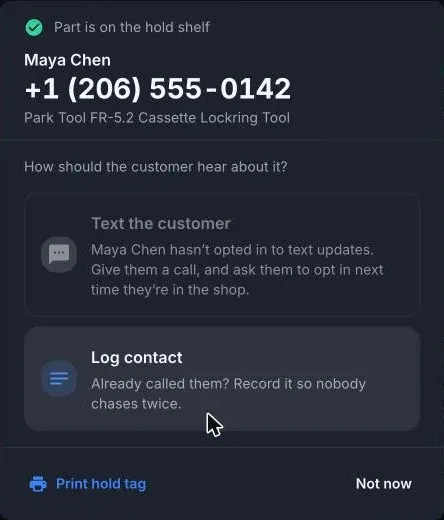
After you put a part on the shelf, ShopTech asks how the customer should hear about it:
- Text the customer: “Your special order is in”. Greyed out, with the reason, if they can’t be texted.
- Log contact if you’ve already called, so nobody chases twice.
- Print hold tag for the box. The tag shows the customer, the item, the arrival date, the PO number, and whether a deposit is held or it’s paid in full.
- Not now.
Nothing is sent or printed on its own. If the wrong part arrived, It’s not actually here moves the order back.
While it waits
Section titled “While it waits”The Ready for pickup bucket shows how long each part has been on the shelf and when the customer was last contacted, turning amber after a week with no contact. Contact customer on the order sends the arrival text or logs a call.
Pickup
Section titled “Pickup”- On the register, open the Special Orders tile and pick the order.
- Choose Add to cart. ShopTech releases the hold, puts the customer on the cart, and adds the part.
- Complete the sale. If a deposit was taken, tender the deposit amount as Store credit. See Check out and deposits.
When the sale is paid, the order is marked Picked up on its own. A prepaid order shows Hand over to customer instead.
Mark picked up in the app only records the hand-over; it takes no payment. Use it for a part that was already rung up another way.
Nobody came
Section titled “Nobody came”For a held part the customer never collected, choose Return it to stock on the order. The hold is released and the unit goes back to sellable stock. Refund any deposit in Shopify POS.