
Stocktakes
A stocktake is a count at one location that, when completed, sets Shopify’s available quantity for each counted product to what you counted. Count the whole shop or just one shelf; products you don’t count are left alone.
Open Inventory → Stocktake. Any role can count and complete a stocktake.
Start a count
Section titled “Start a count”- Choose New stocktake. Give it a name if it helps, like “Back room — June”.
- The stocktake belongs to the location this device is operating from.
- Search by title, SKU, or barcode, or scan. A single scan match jumps straight to the count.
- Enter the Counted quantity. The field shows what Shopify currently has on hand. Choose Add to stocktake.
- Scanning something that’s already on the list offers Update count. A new count replaces the old one; it doesn’t add to it.
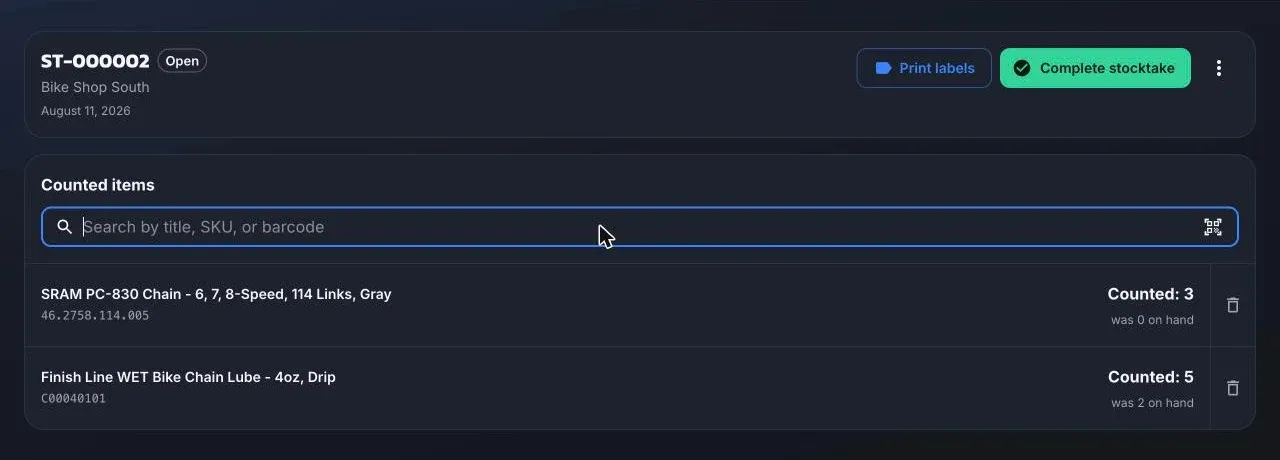
Each line shows what you counted against what was on hand, so you can spot a surprise before you commit. Remove a line if it was a mistake.
A product that isn’t in Shopify yet can be imported from the supplier catalog right from the search, if you have the Purchasing or Admin role.
Several devices can open the same stocktake to count different areas. Two people counting the same product overwrite each other, so split the shop by shelf, not by product.
Complete
Section titled “Complete”Complete stocktake writes the counted quantities to Shopify at this location, with the reason “correction”. It can’t be undone, and an empty stocktake can’t be completed.
If Shopify rejects any line (for example a product without inventory tracking), nothing is applied and the stocktake stays open until you fix it.
Other actions
Section titled “Other actions”- Print labels prints a label for every counted line, defaulting to the counted quantity.
- Void stocktake keeps the record without changing any quantities.
- Delete stocktake removes an open stocktake for good.
The list shows the active location’s stocktakes, open ones first, with filters for status and a search by number or name.