
Plan and shops
Billing is managed from the ShopTech app inside Shopify admin, and charges appear on your Shopify bill.
Every install gets a 14-day free trial with every feature and every location. The Home page in Shopify admin shows how many days are left, and admins get a reminder in the app a week before the trial ends, the day before, and the morning after. When the trial ends without a subscription, creating work orders, purchase orders, special orders, and stocktakes is paused until you subscribe. Nothing is deleted.
- $299 per month includes one shop.
- $150 per month for each additional shop you enable. A shop enabled mid-cycle is free until the next renewal.
- 1,000 text messages per enabled shop each billing cycle, pooled across your shops, so three shops share 3,000. Past that, 4¢ per text, billed through Shopify with your plan. Customer updates, ready notices and special-order arrivals count; the one-time consent confirmation and HELP/STOP replies don’t. Texts are never held back for billing reasons. The Shops page shows this cycle’s count, and admins get a note at 80% and when overage begins. Nothing is billed for texts during the trial.
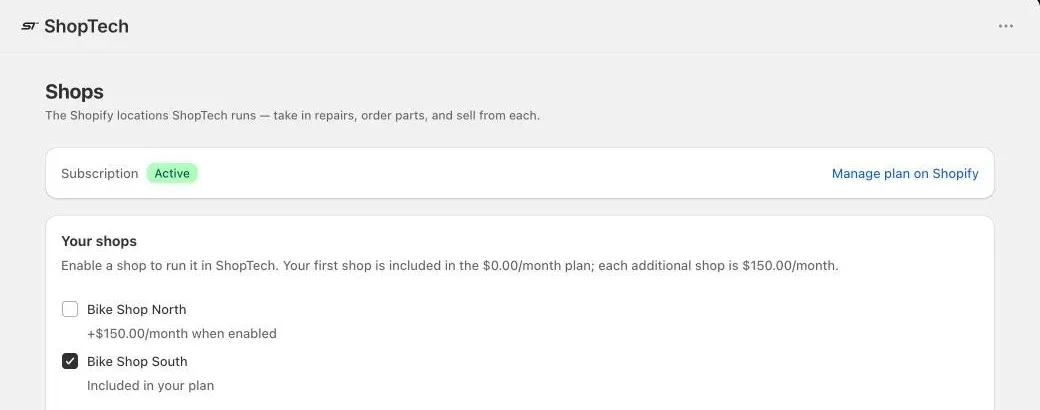
A shop is a Shopify location. The supplier locations that Dropship adds are managed by ShopTech: they don’t count toward Shopify’s location limit, aren’t shops, and aren’t billed. Choose Manage plan on Shopify on the Shops page to subscribe, change, or cancel through Shopify’s plan page.
Enable shops
Section titled “Enable shops”On Shops, tick each location ShopTech should run in and choose Save changes. The page shows what’s included and the running monthly total. Your primary location is enabled at install.
A device operating from a location that isn’t enabled shows This location isn’t enabled when someone tries to create something there. Enable it on this page, or switch the device to an enabled location in Settings → Shops in the app.
Other admin pages
Section titled “Other admin pages”- Home shows the setup guide, work order counts, recent work orders, purchasing counts, plan, and catalog sync status, all linking into the app.
- Settings holds the labor product type and the per-location POS printing switches.