
Text message consent
ShopTech only texts customers who have agreed to it. Consent is collected once at the counter and stays on the customer’s record for your shop.
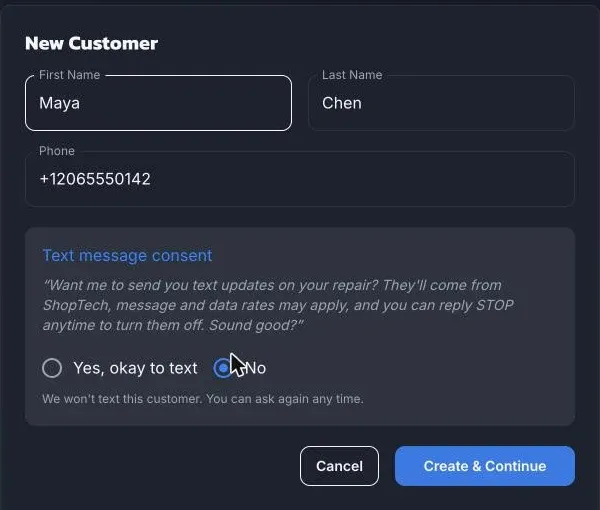
Ask at the counter
Section titled “Ask at the counter”ShopTech asks for consent wherever it’s needed: when you add a customer, when you pick a customer without consent for a work order or special order, and on the customer record under This number needs text consent.
Read the script exactly as shown:
Want me to send you text updates on your repair? They’ll come from ShopTech, message and data rates may apply, and you can reply STOP anytime to turn them off. Sound good?
Then record the answer: Yes, okay to text or No. A “no” isn’t stored, so you can ask again on another visit.
The first time a customer says yes, they get a one-time confirmation text from ShopTech explaining what they’ve signed up for and how to stop.
What texts they get
Section titled “What texts they get”Texts are transactional only and every one is sent by a staff member choosing to send it. Nothing goes out on its own. The texts are:
- Drop-off confirmation, with a link to the repair tracker.
- Ready for pickup, and the same text again as a reminder.
- A message from the shop, which says there’s a new message and links to the tracker. The message itself is never in the text.
- Special order arrived.
Every text starts with “ShopTech (for your shop name):”.
Opting out
Section titled “Opting out”- At the counter: on the customer record choose Opt out. This is immediate and applies to your shop only. You can ask again later.
- By text: the customer replies STOP. This blocks texts from every shop using ShopTech, and only the customer can lift it by replying START. Even after START, you need to read the script again before texting.
- Landlines are flagged automatically when a text can’t be delivered. If the number is actually a mobile, choose This number can receive texts on the customer record.
Replying HELP gets the customer a short help text with the ShopTech support address.