
Listing products
A product is offered from supplier stock when its Dropship flag is on. The flag is a Shopify product metafield, so it survives exports, imports and the bulk editor, and it can be set from three places.
Three ways to list a product
Section titled “Three ways to list a product”- The product page in Shopify admin. The Dropship card shows the switch and, under it, what each connected supplier says about the product: whether it can ship it, how many it has, and what Shopify currently shows at the supplier’s location. It shows this before you turn the switch on, so you know which supplier would ship it.
- The products list in Shopify admin. Select products, open the actions menu and choose List for dropship (or Remove from dropship). Up to 250 at a time. Stock appears on each within a minute.
- The product in ShopTech. Under Inventory → Products, the product’s detail has a Dropship switch and a status line.
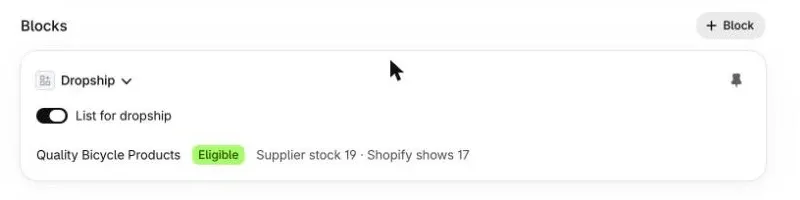
In every case, listing needs at least one supplier turned on. Flags set earlier are picked up when the first supplier is turned on.
What “eligible” means
Section titled “What “eligible” means”For each supplier, each variant is one of:
| Status | Meaning | What to do |
|---|---|---|
| Eligible | The supplier carries it, will ship it to a consumer, and reports stock. | Nothing. |
| Won’t dropship this SKU | The supplier carries it but excludes it from its dropship program (oversized items, some brands). | Sell it from your own stock, or order it to the store. |
| Not carried | The supplier doesn’t sell this product. | Another supplier may. |
| Not matched | The variant isn’t linked to the supplier catalog. | Link it: run Settings → Products → Catalog link → Run backfill, or import the product from the Supplier catalog so it stays linked. See Import products. |
| Not checked yet | ShopTech hasn’t read the supplier’s stock since the flag was set. | Wait a minute. |
A product with several variants can be eligible for some and not others; the card lists them.
In Shopify’s products list, filter by the Dropship status metafield to see every listed product and which suppliers can ship it.
What Shopify is told
Section titled “What Shopify is told”Every hour, and immediately when a product is listed, ShopTech reads the supplier’s stock and sets the quantity at the supplier’s location to the supplier’s total minus two, up to 100. The two units are a buffer against the hour between reads; the cap keeps a distributor’s 9,999 from becoming a sellable 9,999. A variant that isn’t eligible, or that the supplier has run out of, is set to zero.
That quantity is what a customer can buy in one order, and what your reports call sellable at that location. It never counts toward your own on-hand.
Taking a product off
Section titled “Taking a product off”Turn the switch off, or use Remove from dropship. ShopTech zeroes the supplier location’s stock for it within a minute. Orders already routed to the supplier are unaffected.