
Import a brand
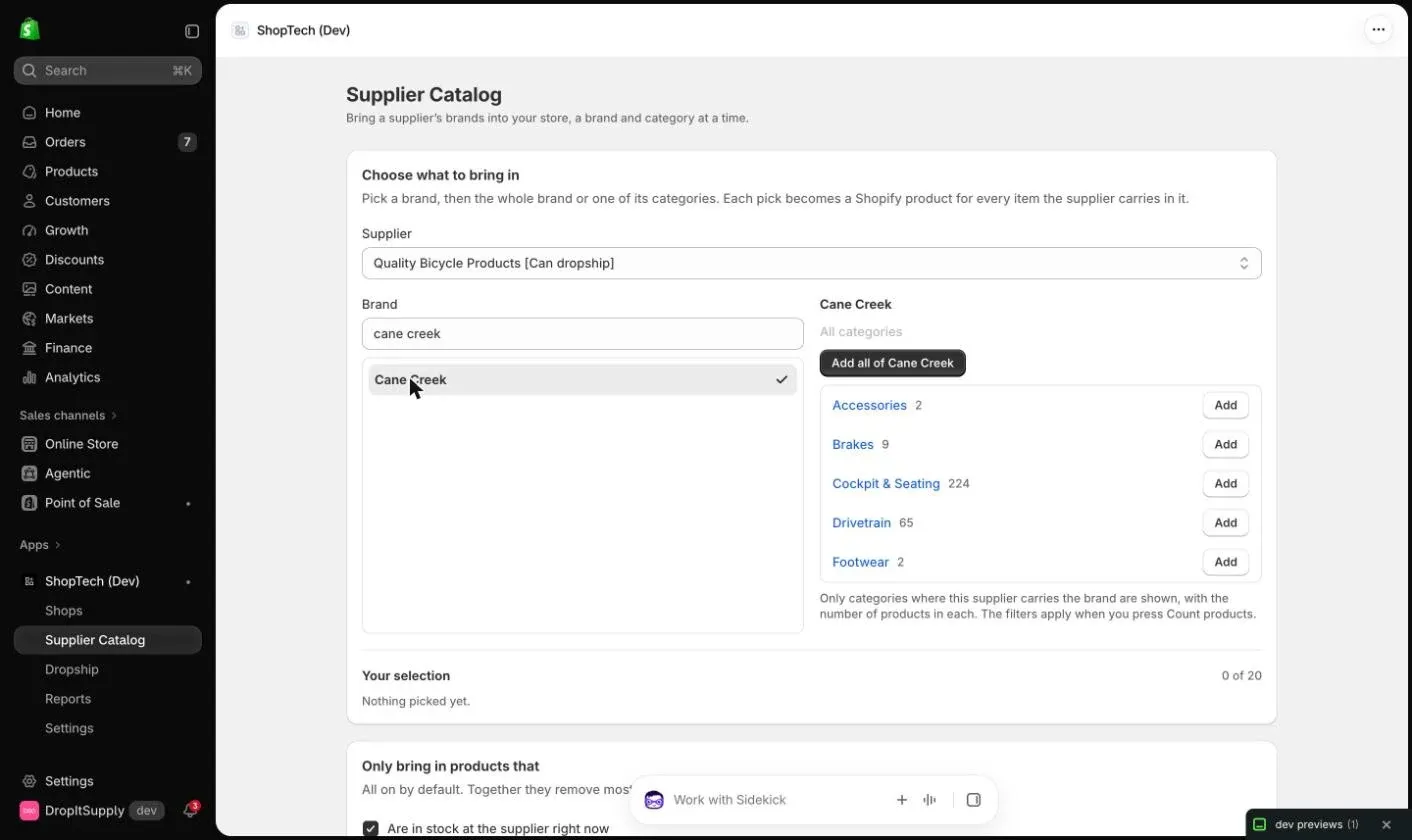
The Supplier Catalog page in Shopify admin creates Shopify products from a connected supplier’s catalog in bulk: pick a brand, optionally narrow it to a category, and ShopTech imports every product the supplier carries in it, with the catalog’s title, images, description, barcode, part number and price, linked to the catalog for cost and stock. It is how a shop with an empty Shopify catalog gets going, and how an established shop adds a brand it has started carrying.
It lives under Apps → ShopTech → Supplier Catalog, because what follows an import (collections, pricing, publishing, the theme) is all Shopify admin work. The Supplier catalog in ShopTech links to it when you’re scoped to one supplier, and the suppliers step of setup offers it once a supplier is connected.
Pick what to bring in
Section titled “Pick what to bring in”- Choose the supplier. Only connected suppliers appear.
- Search for a brand and pick it. The brand’s categories appear on the right, as the supplier files them.
- Add all of the brand, or drill into a category and Add that level. Each pick is one line in your selection, up to 20 per import.
- Leave the filters on unless you have a reason: in stock at the supplier, has an image, has a dealer price for your account. Together they remove most of any feed.
- Press Count products. ShopTech shows the supplier’s count for each pick and the total, with the time it will take.
- Press Import. You can leave the page; the import runs in the background and the page shows its progress when you return.
Products with neither an MSRP nor a MAP are skipped rather than imported at $0; so are discontinued products. Products already in your store are recognised by their catalog link and left alone, so re-running a brand only adds what’s new.
Also list for dropship
Section titled “Also list for dropship”If a supplier is turned on under Dropship, the import can also tick Dropship on every product it creates, so they show the supplier’s stock online straight away. Skip products the supplier won’t dropship keeps the ones it excludes out of the import. See Dropship.
The limits
Section titled “The limits”Shopify slows product creation past a certain store size, a storefront with a hundred thousand products stops being usable, and every listed product costs an hourly stock read for as long as it exists. So the import is curated, with limits that the preview shows before anything runs:
| Limit | Value |
|---|---|
| Products per import | 500 |
| Products imported per day, across all imports | 1,000 |
| Products listed for dropship per store | 2,500 |
| Brand × category picks per import | 20 |
A selection over a limit is refused with the number; nothing is trimmed quietly. Narrow it by category or split it across days. Raising a limit is a plan change: contact support.
Afterwards
Section titled “Afterwards”- Past imports on the page shows what each run created, skipped and why.
- Brands you carry lists every brand and category you have imported. Removing one only forgets the selection; products already in your store stay.
- New products the supplier adds to a brand you carry are not imported automatically. Re-run the brand when you want them.
- Imported products are unpublished to no channel in particular; review them under Products in Shopify admin and add them to collections as you would any new product.